Fabrary.
Built at Rungta International, Surat

Fabric library, buyer enquiries and sample tracking — in one app.

Built for garment exporters and mills who sell at trade fairs. Show your whole range from a phone, capture every enquiry with quantities and target prices, and know exactly which cuttings left with which buyer.

Try it on this page

A working slice of the app, further down. No sign-up, nothing to install.
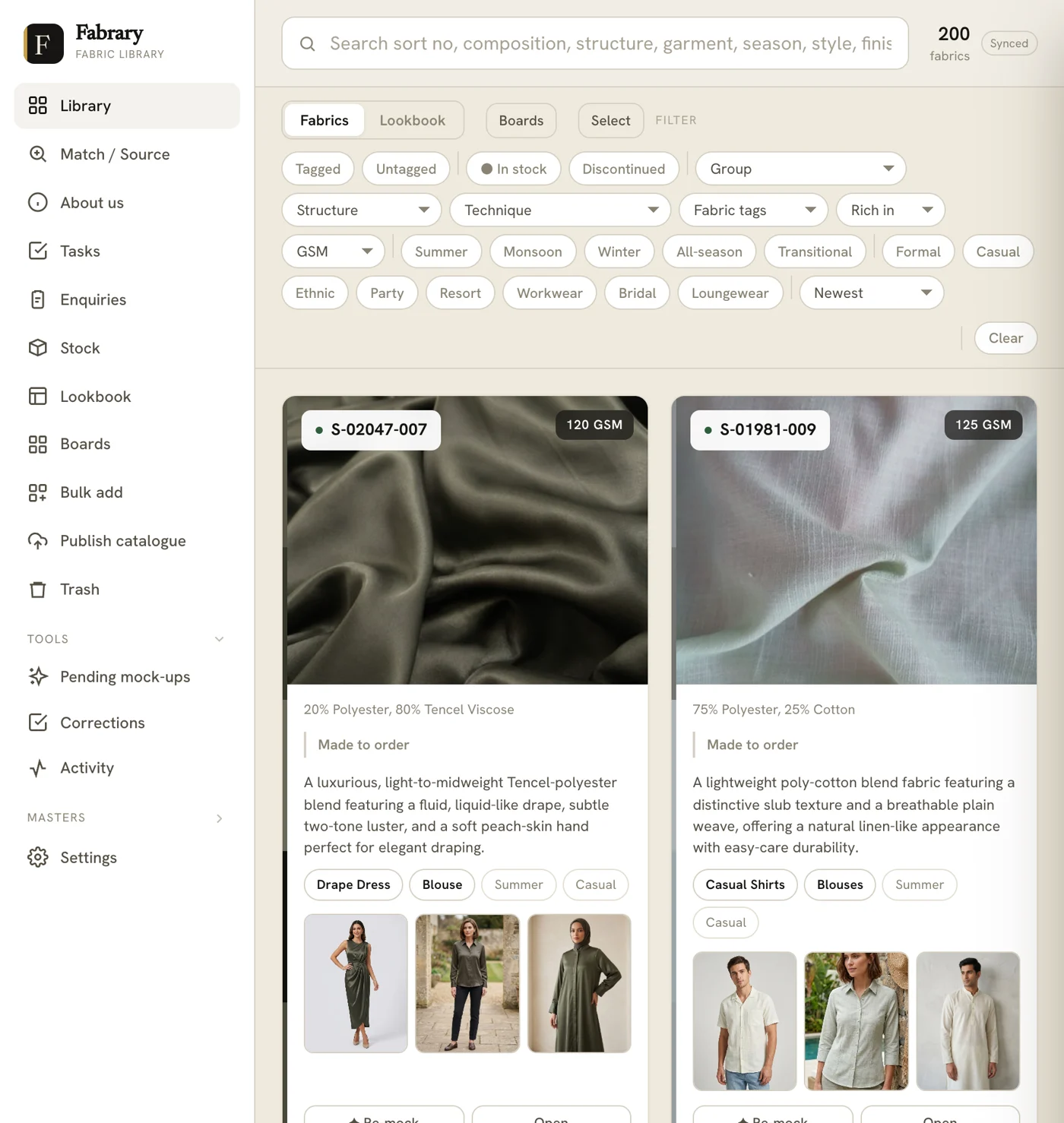
The Fabrary library: a search bar covering sort number, composition, structure, garment, season, style and finish; filters for structure, technique, GSM, in-stock and seasons; and fabric cards each showing a photograph of the cloth, its composition, a written description, garment tags and small garment visualisations.

The library, with 200 fabrics loaded. Search covers sort number, composition, structure, garment, season, style and finish.

Rungta International Textiles

In daily use since 2026. Fabrary was built on Rungta's own floor in Surat, for their own salespeople. Ten of them use it, across 800+ fabrics.

Run live at Bharat Tex 2026

India's largest textile expo, and one of the largest in the world. Rungta International ran their entire stand on Fabrary — ten salespeople, one shared log, buyers walking in from more than forty countries.
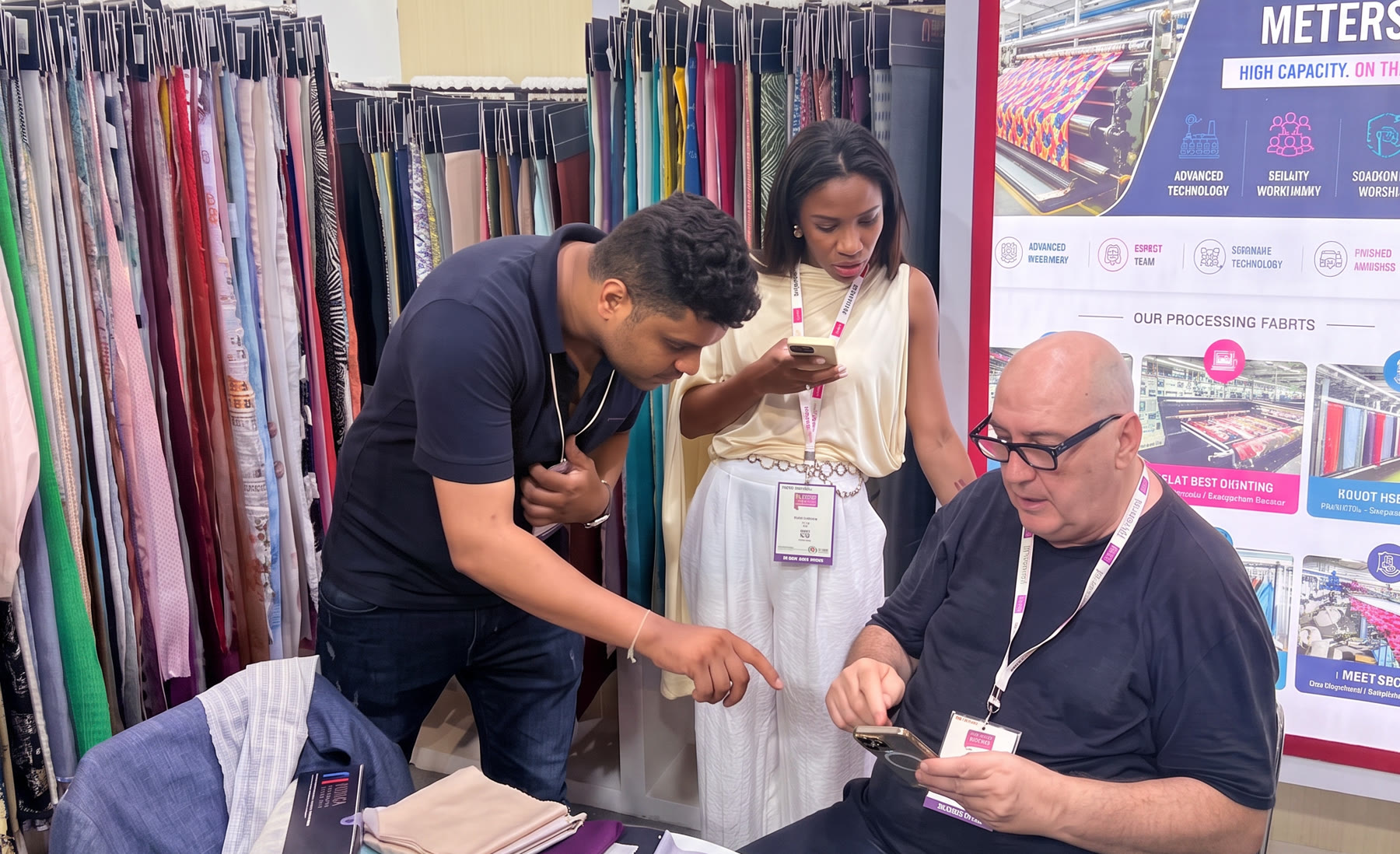
Two overseas buyers at the Rungta International stand at Bharat Tex 2026 in New Delhi. The seated buyer is looking at Fabrary on his own phone while a Rungta salesman leans in to point at the screen; rails of hanging fabric fill the wall behind them.

Bharat Tex 2026 · Bharat Mandapam, New Delhi · July 2026. The buyer is the one holding the phone.

7,000+
buyers on the floor at Bharat Tex 2026
40+
countries represented
800+
Rungta fabrics live in the app
10
salespeople on one shared log

Try it yourself

A working slice of the app, right on this page. Tap a fabric and take an enquiry the way your salesman would at the stall.

Library

200 fabrics · tap any one to start

Weight
Structure
Available

New enquiry

Bellevue Souk · Rana Al-Mansouri

2 metres
Target price — $4.20 / m
Note — needs it in a deeper shade

Saved

ENQ-0006 · logged to the shared list

Bellevue SoukNEW
Nord AtelierFOLLOW-UP
Casa VerdelQUOTED
Halden & RoeSAMPLING
1 · Find the fabricShe points at something on the rail. You find it on the phone instead of walking to the racks.
2 · Check it in front of herWeight, structure, composition and what is actually available — answered on the spot, by anyone on the team.
3 · Take the enquiryHer quantity, her target price, her note about shade. Recorded while she is still standing there.
4 · It is on the listNumbered, owned by a salesman, and visible to everyone — not sitting in one person's notebook.

This is a demonstration built into the page, with real fabric records. The live app also carries sample tracking, business-card scanning, photo match and the selection document.

See it on your own fabrics

What your team does with it

Four jobs, one app, on the phone they already carry. It works with no signal and syncs when the wifi comes back.

Find any fabric in seconds

Your whole range on the phone, with the photograph, composition, GSM, width and structure on every sort.
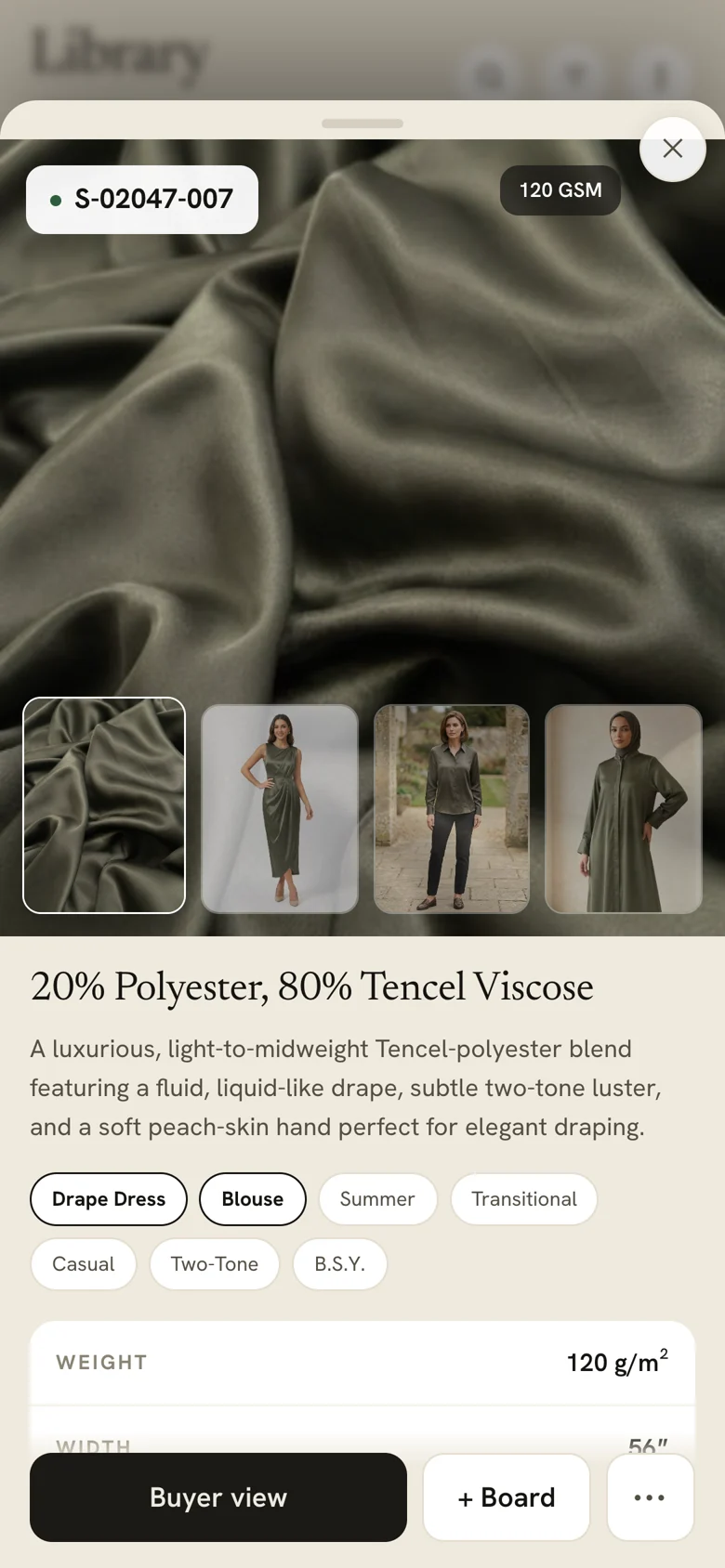
  • Search by sort number, composition, structure or garment
  • Filter by GSM, technique, season or what is in stock
  • A new salesman answers a buyer as well as the owner does
A fabric open in Fabrary: a large photograph of olive satin marked S-02047-007 at 120 GSM, a filmstrip of the same cloth made up as a dress, a shirt and a kurta, then its composition, a written description, garment and season tags, and its weight and width.

Record the enquiry while she is standing there

Add the fabrics she picked, with how much she wants, her target price and a note about shade or MOQ. Photograph her business card and the contact fields fill themselves in.
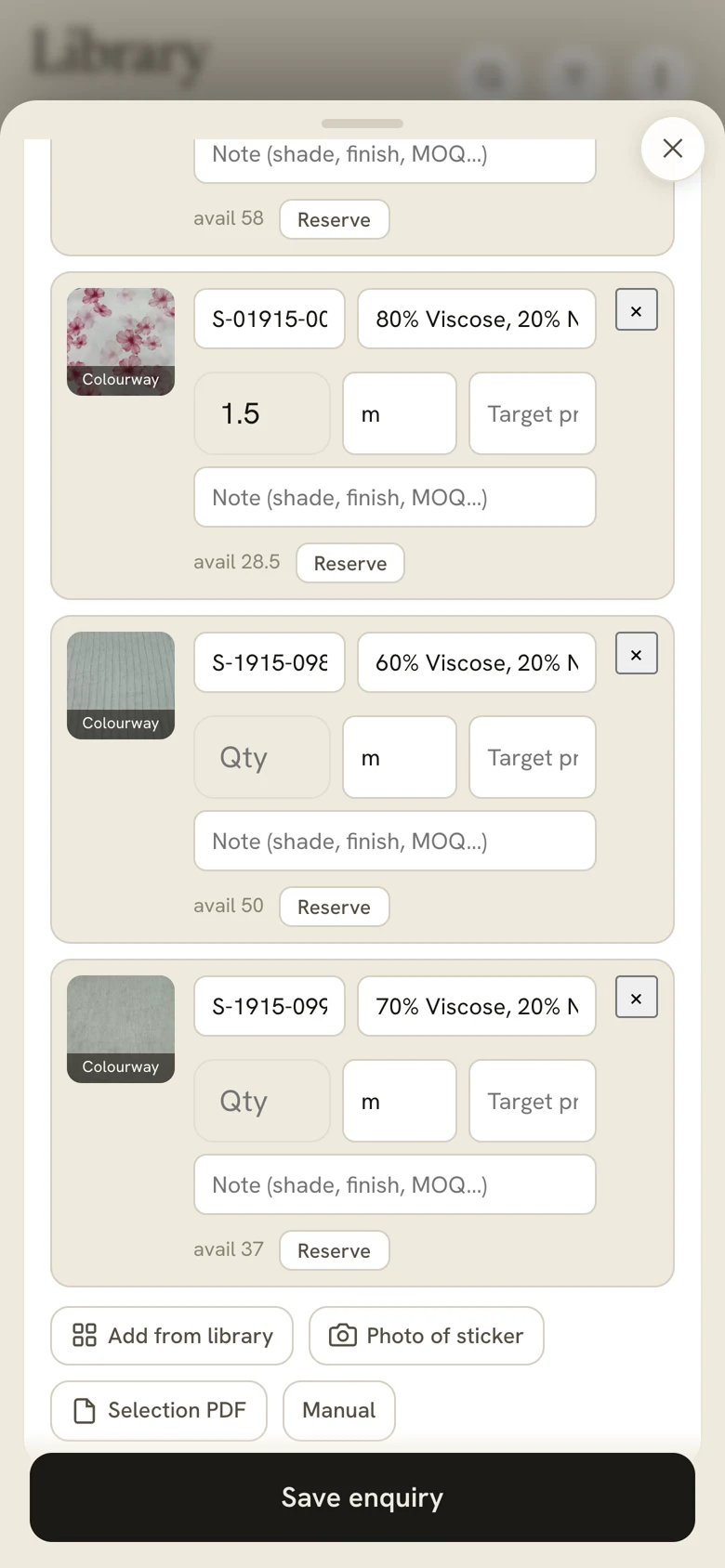
  • Four ways to add a fabric, including a photo of the tag
  • Every enquiry gets its own number and an owner
  • Save her straight to your phone contacts
A buyer's enquiry in Fabrary: three fabric lines, each with a swatch photo, sort number, composition, quantity in metres, target price and a note field, with a Reserve button and available metres beside it. Below are four ways to add a line and a Save enquiry button.

Know which samples left with whom

Reserve a cutting against her enquiry and it comes off your available metres. When it leaves the stand it is issued in her name, marked as a loan if it is coming back, and cleared with one tap when it does.
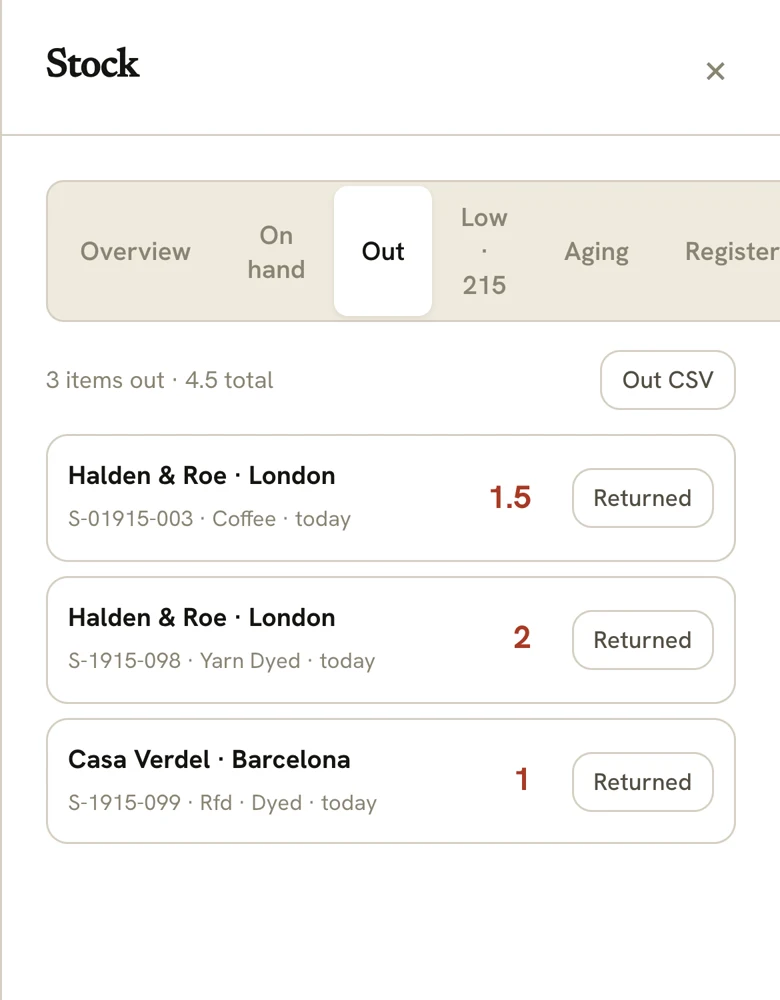
  • On hand, reserved, out, on loan, low and aging
  • Issued by buyer name, with the date and the sort
  • A full register behind it, exportable
Fabrary's stock screen on the Out tab: three items out totalling 4.5 metres, each row naming who has it — Halden and Roe in London, Casa Verdel in Barcelona — with the sort number, finish, date and a Returned button.

Leave the fair with a list, not a pile of cards

Every buyer who stopped, with her country, how many fabrics she took, who owns her and where she has reached — new, follow-up, quoted, sampling, done.
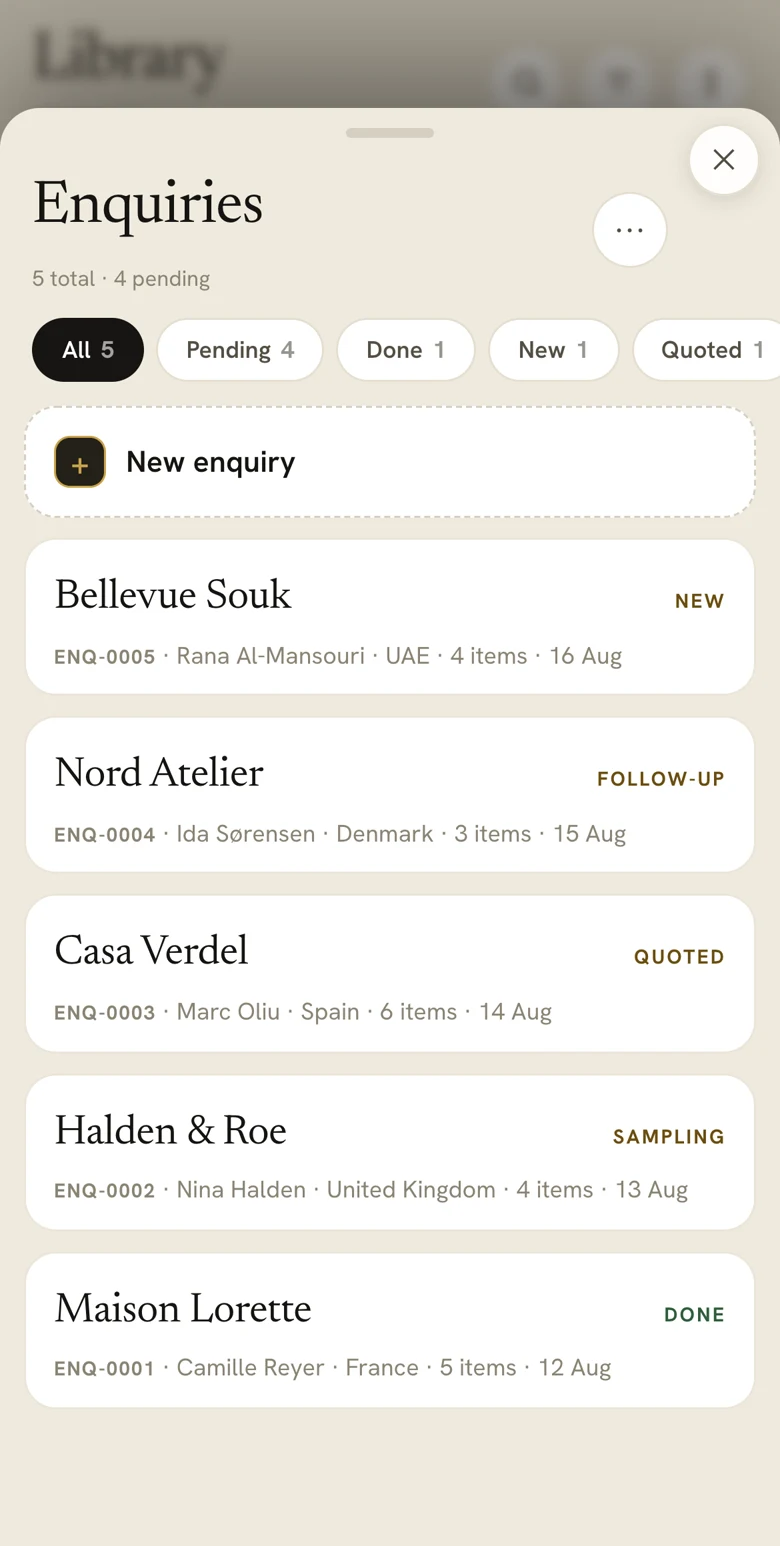
  • Follow-ups become tasks with dates and owners
  • A weekly report, and a share into the team's WhatsApp group
  • One shared log, so nothing sits in one person's phone
The Fabrary enquiries list: five buyer enquiries numbered ENQ-0001 to ENQ-0005 — Bellevue Souk, Nord Atelier, Casa Verdel, Halden and Roe, Maison Lorette — each showing the contact, country, item count and date, tagged New, Follow-up, Quoted, Sampling or Done.

Everything in it

Fabric library
Every sort with its photograph, composition, GSM, width and structure. Searchable and filterable, private to you.
Enquiries
A file per buyer — her contact, her fabrics, quantities, target prices, notes, a status and the salesman who owns her. Each numbered.
Business-card scan
Photograph a card and the company, contact, designation, phone, email and country fill in.
Sample stock
On hand, reserved, out, on loan, low and aging — issued by buyer name and returned with one tap.
Follow-up tasks
Any enquiry becomes a task with an owner and a due date, plus a weekly report and a WhatsApp share.
Selection document
A branded PDF of her picks with her company on the cover, sent on WhatsApp before she leaves.
Photo match
Point the camera at a reference and get the closest cloth you already stock, ranked by look, texture and drape before weight.
Garment visualisations
AI renderings of your fabric made up as a dress, shirt or kurta, so a buyer can see it as a garment. Directional, not production samples.
Fair kiosk
An optional screen on the stand that lets a buyer browse and leave their details while your team is busy.
Your own instance
Your own deployment, your name and mark throughout, your data isolated from every other customer. Works offline.

Where it came from, and what it is not

Where it came from

Fabrary began inside Rungta International, a Surat textile house, because their own salespeople needed it. Thirty years of mill knowledge is written into how it reads a fabric — the weight bands, the surface techniques, the way composition is actually spoken in this trade.

Digiflexx builds and runs it for other companies now. Every customer gets their own instance, set up around their library and their team.

What it is not

  • It does not replace your swatch rail. It is how you sell from it, and how the enquiry gets recorded.
  • It is not an ERP. It will not run your production or your accounts.
  • It is not a marketplace. Your library is private; a buyer sees only what you show her.
  • The garment images are AI visualisations for a conversation, not photographs of production and not a dye standard. Pantone still decides colour.
  • Photo match is a sourcing shortcut, not a lab report.

See it on your own fabrics

Tell us roughly how many sorts you carry and which fair you are preparing for. We will show you the app running, and what your own library would look like inside it.

Message Keshav on WhatsApp
See a live demo WhatsApp